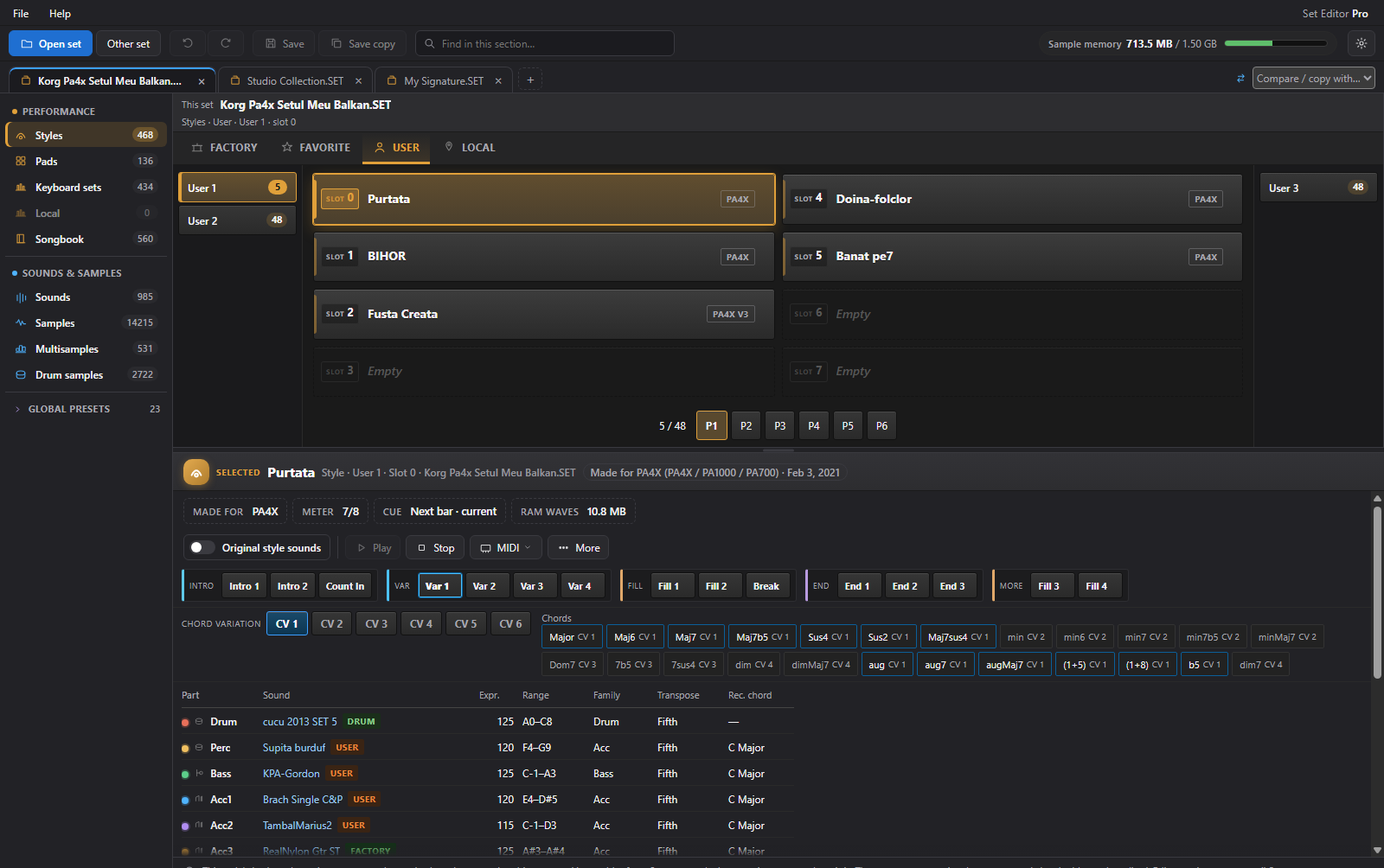
Multiple sets. Open together.
Open several sets at the same time, each in a different tab. Copy and paste compatible styles, sounds, pads, and keyboard sets between them, then merge the resources you want to keep.
KORG PA SET & KST EDITOR
Set Editor Pro is desktop software for organising and editing KORG PA SET and Pa5X KST collections.
Open multiple sets at once, each in its own tab. Compare banks, preview style parts, and bring your favourite sounds and styles together.
EARLY ORDER$119.99 for Pro ↗Planned for Windows, macOS & Linux · Early-order price: $119.99 · One-time Pro licence

YOUR NOTES. YOUR TUNING.01 / MEET YOUR NEW WORKSPACE
Your set deserves more than a tiny screen.
Explore, organise, and shape it on your computer, with room to see the bigger picture.
Keep multiple sets open simultaneously in separate tabs. Compare two side by side, then copy, paste, and merge compatible styles, sounds, pads, and keyboard sets. Associated user resources come along through dependency-aware copying.
Choose a workflow and explore the real screens in our guided product tour.
Explore styles, sounds, pads, keyboard sets, and samples in your Korg PA set folders.
Compare sets side by side. Select the parts you love, edit, and bring them together.
Save a new set folder, keep a backup, and check the result on your keyboard.
02 / THE COMPLETE CREATIVE WORKSPACE
Multiple sets. Every style part. Every oscillator.
Explore the tools at your own pace.
Open several sets at the same time, each in a different tab. Copy and paste compatible styles, sounds, pads, and keyboard sets between them, then merge the resources you want to keep.
Explore variations, intros, fills, breaks, and endings. Follow the live note lanes, open the event editor, and give pads their own creative space.
Inspect every OSC and its layers. Explore mapped multisamples on a playable keyboard, then shape eligible sample audio inside the same workspace.
Open Global presets, MIDI setups, and quarter-tone tuning. Explore keyboard sets, track sounds, and the supported performance controls.
Find missing audio, unused samples, duplicate audio, and memory-budget issues. Inspect the findings before choosing the cleanup or repair workflow.
Work with one eligible sample or prepare the whole set. De-Compress when you need uncompressed audio for editing, then apply prepared changes through Save.
GLOBAL, OPENED UP
The Global section has its own place in the workspace. Browse the presets stored in your set, see your quarter-tone tuning, and keep the wider playing setup in view.
Preset contents and supported operations depend on the keyboard model and set. The screenshot shows the actual expanded navigation.
A CLOSER LOOK
Real tools, real screenshots. Select an image for a closer look.
Find missing audio, unused samples, duplicate audio, and memory-budget issues. Inspect a finding, then choose the cleanup or report tool that fits.
Explore these tools ↗Choose an intro, variation, fill, break, or ending. Hit Play and follow the coloured note lanes and moving playhead through the selected part.
Explore these tools ↗Inspect each OSC, its high and low multisample layers, key ranges, pan, and pitch. Add or remove eligible oscillators and open the deeper trigger, velocity, EQ, and voice controls.
Explore these tools ↗Inspect, find uses, rename, copy, cut, pick for swap, discard unsaved changes, or delete. The slot menu keeps everyday actions beside the selected item.
Explore these tools ↗Keep your collection recognisable. Name your sounds and organise the slots around the way you work, with supported Undo and discard options when you need a way back.
Explore these tools ↗Compress an eligible sample or prepare the whole set. De-Compress when you need uncompressed audio for editing. The memory budget stays in view.
Explore these tools ↗Explore the piano roll and event list. Transpose, quantize, and adjust note pitch, velocity, start time, and duration. Work with supported tracks and MIDI patterns.
Explore these tools ↗Click, hold, or slide across the keys—or use your computer keyboard. Hear the mapped RAM sample pitched from its root note, with the zones clearly in view.
Explore these tools ↗Create an eligible user or drum-kit sound bank within your keyboard’s limits. Give supported banks names that make sense for your collection.
Explore these tools ↗Adjust gain, reverse, invert phase, normalize, trim, filter, or EQ eligible audio. Keep useful sample work inside the same workspace.
Explore these tools ↗Browse and preview pads. Explore One-Shot or Loop behaviour, cue, meter, expression, and recorded chord, then take supported patterns into the MIDI tools.
Explore these tools ↗Explore quarter-tone presets on a clear per-key keyboard. See each note’s cents and work with the supported presets and keyboard-set tuning controls.
Explore these tools ↗Create a new user sound in an eligible empty slot. Start with a blank oscillator, then shape the sample layers and parameters. Paste compatible copied styles into available style slots.
Explore these tools ↗Find missing audio, unused samples, duplicate audio, and memory-budget issues. Inspect a finding, then choose the cleanup or report tool that fits.
Explore these tools ↗Adjust gain, reverse, invert phase, normalize, trim, filter, or EQ eligible audio. Keep useful sample work inside the same workspace.
Explore these tools ↗Explore the piano roll and event list. Transpose, quantize, and adjust note pitch, velocity, start time, and duration. Work with supported tracks and MIDI patterns.
Explore these tools ↗Inspect each OSC, its high and low multisample layers, key ranges, pan, and pitch. Add or remove eligible oscillators and open the deeper trigger, velocity, EQ, and voice controls.
Explore these tools ↗Explore quarter-tone presets on a clear per-key keyboard. See each note’s cents and work with the supported presets and keyboard-set tuning controls.
Explore these tools ↗Create an eligible user or drum-kit sound bank within your keyboard’s limits. Give supported banks names that make sense for your collection.
Explore these tools ↗Keep your collection recognisable. Name your sounds and organise the slots around the way you work, with supported Undo and discard options when you need a way back.
Explore these tools ↗Compress an eligible sample or prepare the whole set. De-Compress when you need uncompressed audio for editing. The memory budget stays in view.
Explore these tools ↗Choose an intro, variation, fill, break, or ending. Hit Play and follow the coloured note lanes and moving playhead through the selected part.
Explore these tools ↗Browse and preview pads. Explore One-Shot or Loop behaviour, cue, meter, expression, and recorded chord, then take supported patterns into the MIDI tools.
Explore these tools ↗Click, hold, or slide across the keys—or use your computer keyboard. Hear the mapped RAM sample pitched from its root note, with the zones clearly in view.
Explore these tools ↗Inspect, find uses, rename, copy, cut, pick for swap, discard unsaved changes, or delete. The slot menu keeps everyday actions beside the selected item.
Explore these tools ↗Create a new user sound in an eligible empty slot. Start with a blank oscillator, then shape the sample layers and parameters. Paste compatible copied styles into available style slots.
Explore these tools ↗Explore per-key cents, quarter-tone presets, and supported keyboard-set scales.
See quarter tone ↗Browse keyboard sets, SongBook entries, track assignments, and supported lyrics tools.
Explore SongBook ↗Use supported Undo and Redo, Save copy, previous-folder backup, and unsaved-change checks.
Explore the save workflow ↗Search every tool or open a workflow group.
12 feature groups · Open a group to explore
Try a broader word, or return to all workflows.
Pro unlocks every current feature. The free trial gives you 3 days of browsing and preview.
MAKE ROOM FOR YOUR NEXT IDEA
THE KORG PA FAMILY / ACROSS GENERATIONS
Find your keyboard. Build your collection.
Each model has its own place in the Pa family.
Pa5X support with KST workflows. Tools follow the model and set format. Pa4X OS NEXT is an operating-system update for Pa4X.
03 / THE NEXT CHAPTER
We’re building toward a workspace that helps you create, as well as organise.
Expand beyond Korg, with Yamaha set and style workflows. Cross-brand capabilities are still being explored.
Explore automatic style and sound creation, with AI as a creative starting point.
Join the waitlist for news from the next chapter.
04 / YOUR EARLY-ORDER ADVANTAGE
Join the waitlist for news.
Reserve Pro for $119.99 with your early order.
Join the waitlist for trial access. Your 3-day trial covers browsing and preview; Pro unlocks editing, merging, saving, and every current feature.
Join the waitlist ↗USD · one-time licence
Save $29.01 with your early order.
Planned platforms: Windows, macOS and Linux. Major version upgrades are separate. Future AI features are separate from this offer.
Reserve my early-order priceSend your early-order request. We’ll email the order details.
Reserve Pro for $119.99 USD instead of the regular $149 price, saving $29.01. Choose Early order below and send your details. We’ll email you personally with the order details.
Korg Pa models from Pa50 through Pa5X, alongside microARRANGER. Find your model in the list above. Available tools follow the model and set format, including Pa5X KST workflows.
Every current app feature: editing, copying and merging between sets, bank and slot operations, audio processing, SET Doctor repair tools, saving, and exports.
Join the waitlist for trial-access updates. The free trial gives you 3 days to browse and preview in the desktop app. Editing, saving, and exports are available in Pro.
Your Pro licence includes updates within the major version you purchase. Major version upgrades are separate.
Yamaha workflows and AI-assisted style and sound creation are on the roadmap. The early-order Pro offer covers the current Korg toolset.
Set Editor Pro is planned for Windows, macOS and Linux. Join the waitlist for platform-specific trial and release updates.
YOUR NEXT SET STARTS HERE
Join the waitlist for news.
Save $29.01 on Pro with your early order.